Dashain 2083 Holiday Notice!
UI/UX Design Training
UI/UX Design Training in Kathmandu, Nepal




Thousands of students have started their careers after getting certified by Broadway Infosys
Updated On: 12/10/2026
Created On: 17/06/2022
Course Overview
Broadway Infosys provides the most proficient UI/UX Design Training, equipping aspiring designers with the skill set required to build intuitive and impactful interfaces for mobile and web applications. The course centers around a customer experience CX-centric approach, mixing design theories and practical usage of tools like Figma and Adobe XD to create products that are user-friendly and appealing.
While the demand for UI/UX professionals has been soaring in Nepal's tech industry, there still exists a shortage of qualified professionals. Recognizing this hole, Broadway Infosys has planned a career-oriented training program in close collaboration with industry experts. This course is suited to candidates who are either fresh IT graduates or graphic designers eager to hone their skills more specifically towards product design and user experience.
Through sessions led by experts, projects based on the real world, and portfolio building, learners acquire all the knowledge and confidence necessary for surviving in the competitive market of design.
Tools Covered
Some of the major industry-relevant tools you'll work with in this course include:
-
Figma
-
FigJam
-
Xmind
What Our Students Say About UI/UX Design Training

Ms. Kasak Shrestha
UI/UX Design Training
I had a really great learning experience. The teacher was very supportive and explained in a clear way. I'm really grateful to Broadway Infosys for providing such a good learning environment and helping me build my UI/UX skills with confidence.

Mr. Riwaj Joshi
UI/UX Design Training
My experience at Broadway Infosys during the UI/UX Design course was excellent. I learned many useful concepts and practical skills that helped me understand design more clearly. The teaching environment was supportive, and the instructor explained everything in an approachable...

Mr. Raman Sejuwal
UI/UX Design Training
I feel very positive about both my teacher and Broadway Infosys. My teacher is highly supportive and explains concepts clearly, while Broadway offers a professional learning environment with strong practical exposure and good career support.
Students who got hired learning with us
Hear from graduates who have completed our courses.
College/Faculty: Lumbini City College / BCA
Working At: COL Thinkspace
Position: UI/UX Design Intern
College/Faculty: Patan Multiple Campus / BSc. CSIT
Working At: COL Thinkspace
Position: UI/UX Design Intern
College/Faculty: Danfe College / BCA
Working At: COL Thinkspace
Position: UI/UX Design Intern
College/Faculty: Lumbini ICT Campus / BIM
Working At: M.S. Engineering And Complete Solution Pvt. Ltd.
Position: UI/UX Intern
Our graduates are hired by 470+ companies in Nepal
Time for you to be the next hire. With our advanced and industry relevant courses, you are on the right stage to start your dream career.

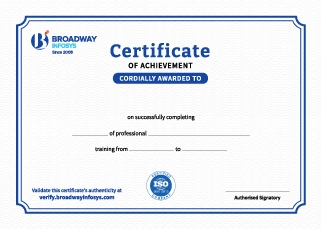
Earn a High Value Industry Certificate
Add this credential to your LinkedIn profile, resume, or CV to stand out to recruiters.
Already earned a certificate?
Verify it here
Frequently Asked Questions
No prior professional UI/UX design experience is required. Basic computer knowledge and an interest in design and creating user-friendly digital experiences are enough to get started.
Yes. The training covers UI/UX design from the fundamentals, making it suitable for beginners as well as learners who want to develop their existing design skills.
No specific degree or professional experience is required. The training is suitable for students, beginners, career changers, and working professionals who want to build or upgrade their UI/UX design skills.
You will learn UI design, UX principles, user research, information architecture, wireframing, prototyping, usability testing, visual design, and design systems to create effective digital experiences.
Yes. You will learn how to create wireframes, user flows, interactive prototypes, and high-fidelity designs to visualize and test digital products before development.
Yes. You will learn the fundamentals of user research, identifying user needs, creating user personas, usability testing, and using feedback to improve designs.
Yes. You will explore Figma AI and other AI-powered features to speed up design workflows, generate ideas, improve designs, and support the UI/UX design process.
Yes. You will learn how Figma Make can help turn design ideas and prompts into functional prototypes or web experiences, making it easier to move from design concepts toward implementation.
Yes. You will learn how to create motion, transitions, micro-interactions, and interactive prototypes in Figma to make digital experiences more engaging and realistic.
Yes. The course covers important UX Laws and usability principles, such as Jakob's Law, Fitts's Law, Hick's Law, Miller's Law, and other principles that help create intuitive and user-friendly interfaces.
Yes. You will learn how to document the UX process, including user research, personas, user journeys, user flows, wireframes, design decisions, usability findings, and other relevant UX documentation.
Yes. You will learn to create high-fidelity and interactive prototypes with transitions, animations, interactions, and user flows to test and demonstrate your designs.
You will be able to create responsive websites, structure web pages using HTML, style them with CSS, add interactive elements using JavaScript, and apply basic UI/UX principles.
The training can help you pursue roles such as Web Designer, Front-End Developer, UI Designer, Web Developer, or work as a freelance web designer.
You will receive hands-on guidance and feedback from trainers throughout the course, including support with Figma, UI/UX projects, design concepts, prototyping, UX documentation, and portfolio development.
Yes. Depending on your requirements, you can discuss suitable schedules with the training team. One-to-one training and group-based learning options may also be available.
Our course is available in hybrid training mode. You can attend classes in person or join online, whichever works best for you. If you cannot attend in person on a particular day, you can simply join the class online instead.
The course pricing varies depending on the subject and level. For detailed information on the course price, please contact us directly: +977-9841002000 / +977-1-4111849. Our team will be happy to guide you or send us an email at [email protected].
Our syllabus outlines are only the headlines of the major modules. To ensure a complete understanding of the course, we offer free counseling. Also, if you have specific modules in mind, you can customize the course. Send your inquiry today!
Lesson 1:
- Introduction to User Interface Designing and User Experience Designing
- Basic UI/UX Design Principles
- Understanding the Design Process
- Elements of UX Design
- Top skills to have as a UX Designer
- Group Activity:
Cross-Functional Design Sprint Session: Form teams to rapidly define a problem, sketch, and critique ideas for a shared challenge - Working as a UX/UI Designer: Design Sprints
Understanding the details of projects for choices.
Project: These are the projects for choices to learn from
- E-commerce platform overhaul
- Educational Platform for Remote Learning
- Travel Planning and Booking Platform
- Smart Home Management System
- Walkthrough of Figma as a Design Tool
- Understanding Auto Layouts and its use
- Designing visual components and variants
- Getting familiar with variables and conditions
- Group Activity:
Component Library Relay: Teams collaborate in a single Figma file to build a synchronized UI component kit, passing sections to each other to test auto-layout integrity and naming conventions.
Project: Design a simple Landing Page using Figma with Auto Layouts and component design capabilities to get hands-on experience and become familiar with using the tool.
- Conducting User Research and Why It Is Important
- Competitive Analysis
- User Profiles
- Open-Ended Questions and Conducting Interviews
- Empathy Mapping
- User Persona
- UX Laws
- UX Documentations
- Group Activity:
Live User Interview Roleplay: In pairs, students take turns acting as the researcher and the user, conducting recorded interviews, drafting real-time open-ended questions, and collaborating on an Empathy Map based on the findings.
Project: Conduct research, collect data, and create a User Persona for the project of choice from one of the list below:
- Ecommerce platform overhaul
- Educational Platform for Remote Learning
- Travel Planning and Booking Platform
- Smart Home Management System
- Using mood board for inspiration
- Brainstorming and Sketching*
- Wireframe: Low Fidelity and High Fidelity
- Converting ideas into wireframes
- AI wireframe generators (UXPilot, Miro)
- Creating user flows with AI (Figma Make & FigJam AI)
- Best practices for refining AI outputs
- Understanding Grids and Layouts Systems
- Group Activity:
"Crazy Eights" Sketching Jam: Teams rapidly sketch 8 distinct layout ideas in 8 minutes, pin them up digitally in FigJam, and use dot-voting to select the strongest concepts for wireframing.
- Journey Mapping and User Flows
- Card Sorting Methods
- Information Architecture for Intuitive Navigation
- Researching when you don’t have access to users
- Analysing User Data
- Group Activity:
Collaborative Card Sorting Workshop: Working in teams using digital cards (via FigJam or Miro), students sort features into logical categories based on simulated user mental models to define an intuitive site architecture.
Project: Create User Flow and Architecture for the project chosen earlier during the start of the course.
- Understanding the UX Design principles
- User Scenarios and Problem Statements
- Writing hypothesis to the problems identified and generating ideas based on needs
- Understanding Gestalt and UI Design Principles
- Elements of UI Design: Color, Typography, and Iconography
- Accessibility in Design
- User Controls and Patterns
- Prompt engineering for UI Design and UX Research
- Creating style guides and using it for UI Design
- Generating UI concepts using AI
- Creating design systems with AI assistance
- Image generation prompts
- Creating illustrations with AI
- Background removal and image enhancement
- Ethical use of AI-generated visuals
- Color palette generation
- Typography recommendations (Fontjoy, Figma’s Native AI Typography Pairer)
- Figma Motion
- Figma Make
- Group Activity:
Design System Critique & Audit: Teams review each other’s generated UI concepts and style guides against web accessibility (WCAG) standards and consistency guidelines, providing constructive peer feedback.
Project: Ideate and create a user interface for the project chosen in earlier weeks, including style guides.
- Prototyping with Figma
- Introduction to Interaction Design Principles
- Understanding Micro and Macro Interactions
- Conducting Usability Tests
- Understanding different Testing methods for a design project
- Creating Flows for Developer Handoff
- Group Activity:
Usability Testing Lab: Teams test each other's clickable prototypes, observing pain points, recording friction areas, and synthesizing the feedback into actionable iteration steps.
Project: Create a working MVD with a clickable prototype and flows of the project chosen in the earlier week.
- Understanding the key elements of a portfolio: UX Case Study
- Planning and designing your portfolio
- Structuring your resume to get noticed by humans and AI
- Discussing your FINAL PROJECT SUBMISSION
- Design Interview Preparation tips and common questions to tackle
- Understanding aspects of working in the real world as a designer
- Popular AI tools for UI/UX Design (ChatGPT, Gemini, Figma AI, Canva AI, Google Stitch, Google AI Studio, UIzard, Claude, Lovable)
- Designer vs AI
- Building an AI-assisted workflow
- Design Portfolio Review & Critique: Review sessions where students present their draft case studies and receive structured feedback on storytelling, layout, and UX depth.
FINAL PROJECT: CHOOSE A DESIGN PROJECT TO PURSUE AS YOUR FINAL PROJECT SUBMISSION AND CREATE A CASE STUDY
TOOLS TAUGHT: Figma, FigJam, Xmind


Upcoming Classes (7)
Why UI/UX Design Training?
Core UI/UX Principles: Learn user research, personas, and journey mapping before jumping into design, build products grounded in real user needs, not just visuals.
Real Projects, Real Choice: Work on live-style projects like e-commerce platforms, remote learning apps, or smart home systems; pick what excites you and build it end-to-end.
Industry-Standard Tools: Master Figma, FigJam, and XMind; the exact tools design teams use for wireframing, prototyping, and collaboration.
Portfolio-Ready by Design: Every module builds toward a final case study project, leave with a polished UX case study ready to show employers, not just class notes.
High Demand, Real Shortage: Nepal's tech industry is actively short on qualified UI/UX professionals; the course fills a real market gap, not just a resume line.
AI-Enhanced Design Workflow: Explore how AI can streamline user research, design workflows, and usability testing, working faster without losing the human insight behind good design.
Quick Inquiry
Choose class schedule(s)
-
27 Oct 2026
-
01 Nov 2026
-
16 Nov 2026
-
17 Nov 2026
-
23 Nov 2026
-
24 Nov 2026
-
29 Nov 2026