


Manual time-blocking has a reliability problem: you set aside 2–4 PM for deep work, and the moment a new meeting gets booked over it, the block either gets overwritten or quietly disappears. There’s no built-in mechanism to defend it.
An AI calendar solves this by treating Focus Time as a goal instead of a fixed appointment. AI Tools like Reclaim.ai and Gemini in Google Calendar automatically find open slots for deep work, add them to your calendar, and reschedule them the moment something conflicts, so the time stays protected even as your week changes.
This blog covers what AI time-blocking actually does, how Reclaim.ai and Gemini compare, and exactly how to set up zero-click Focus Time on your own calendar.
What Is an AI Calendar?
Traditional time-blocking means you manually carve out chunks of your calendar for specific work. It’s effective until your schedule changes, which is most days. One new meeting and your carefully blocked Tuesday afternoon is gone.
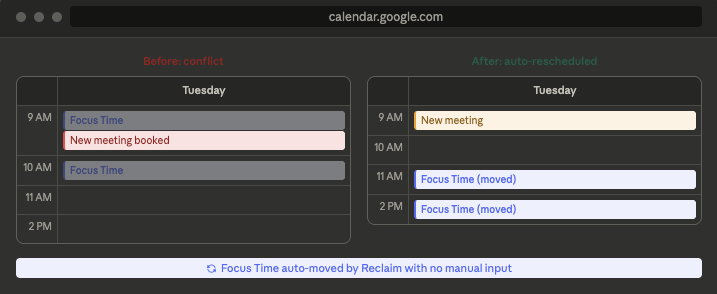
An AI calendar changes everything. You input a single rule: “I want 15 hours of Focus Time each week”, and then it identifies the best time slots, adds them to your calendar, and if something conflicts, it will automatically reschedule them. You no longer have to click and drag blocks around every morning. The calendar does it for you.
This is what’s often called agentic AI, AI that takes the action itself instead of just suggesting one. If a meeting gets moved onto your deep-work block, you don’t get a notification asking you to re-block your time; the block shifts to the next best slot on its own. The exchange of rearranging your day around other people’s calendars is arguably the most tedious part of scheduling, which happens without you touching anything.
Why Manual Blocking Breaks Down
The core issue isn’t discipline; most people who struggle to protect their focus time aren’t lazy or just disorganized, they’re basically working with a system that was never really designed to defend itself, and that matters more than people think.
- Manual blocks are static; your calendar isn’t. One new meeting and the block is gone.
- There’s no self-defense mechanism. When something overwrites your focus slot, nobody reschedules it. That job falls back to you.
- It fails at the worst time. Rebuilding your schedule usually happens first thing in the morning, when something else is already competing for your attention.
-
The losses are small, yet they keep piling up. Each overwritten block feels kind of minor in the moment, but by Friday, the work that needed room never got any.
-
It creates a false sense of planning. A calendar full of focus blocks looks organized. But if none of them survive contact with your actual week, they’re decorative.
Reclaim.ai vs. Gemini: Which AI Calendar Should You Use?
Both AI calendar tools can find you Focus Time, but they work differently and serve different needs.
| Reclaim.ai | Gemini (Google Calendar) | |
| What it is | A dedicated AI scheduling app that layers on top of Google Calendar or Outlook. | Built natively into Google Calendar and Workspace (no separate app). |
| Focus Time | Set a weekly goal; the AI protects it and keeps re-optimizing as your schedule changes throughout the week. | Suggests focus blocks based on your calendar patterns, but doesn’t dynamically re-adjust them as your week shifts. |
| Meeting scheduling | Auto-schedules meetings, tasks, and habits around your existing events; can sync across multiple calendars. | “Suggested times” checks attendee availability when you create an event (currently desktop only). |
| Tasks & habits | Dedicated Habits and Tasks features that auto-find time for recurring routines and deadline-driven work. | No native task or habit auto-scheduling. |
| Availability | Free plan covers the basics (limited habits); paid tiers unlock unlimited habits and team features. | A Google Workspace feature (not available on free personal Google accounts). |
| Best for | Anyone who wants Focus Time actively and continuously defended, with minimal manual upkeep. | Teams already inside Google Workspace who want lightweight scheduling help without adding another app. |
Bottom line is, if you want Focus Time that kinda adapts on its own as your week shifts around, Reclaim is the more capable option. If you’re already pretty deep in Google Workspace and just want some planning help without adding a new tool, Gemini’s built-in suggestions are a reasonable place to start.
How to Set Up Your AI Calendar for Zero-Click Focus Time
Step 1: Connect Your Calendar
For Reclaim, sign up and connect your Google or Outlook calendar. That way, the AI gets a view of what you already have going on, such as your current sessions. As for Gemini, the focus time recommendations are basically already built into Google Calendar if you’re using an eligible Workspace plan, so no need to add an extra connection.
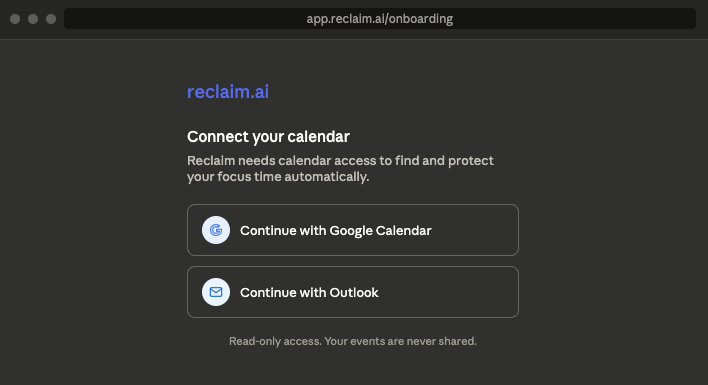
Step 2: Set your Focus Time goal
Decide how many hours of deep work you actually need each week. Be realistic, not aspirational. In Reclaim, this is a direct setting (“Focus Time goal: 12 hrs/week”). In Gemini, you can accept its suggested blocks or set your own recurring ones.
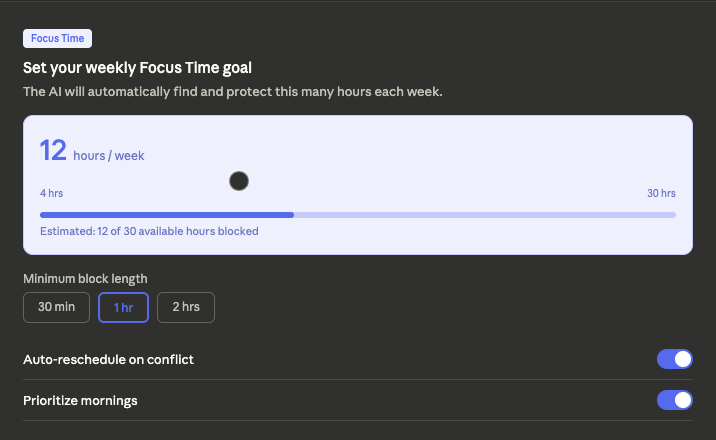
Step 3: Set your working hours and buffers
Define the hours you’re actually available so the AI doesn’t generate a meeting-focused block beyond those hours. Also, if you use Reclaim, you should also place buffers between meetings; that is, short time frames between scheduled call conferences or virtual events to ensure that your deep work time works as it should.
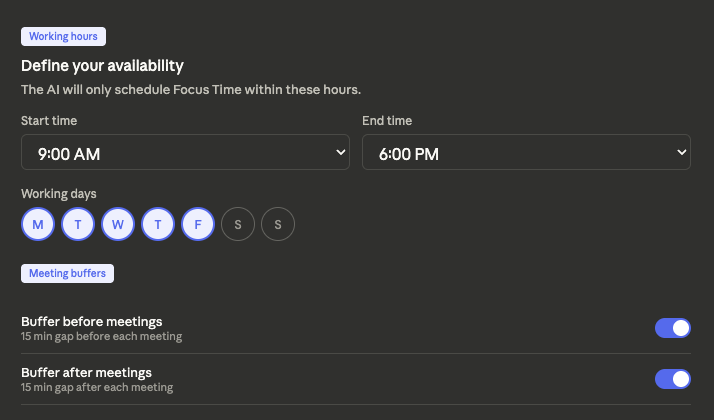
Step 4: Let the AI place your blocks
Once your saved preferences have been updated, the AI will search your Calendar for the remaining available slots, and will ‘book’ Focus Times in those slots using the same priority as an actual meeting or event.
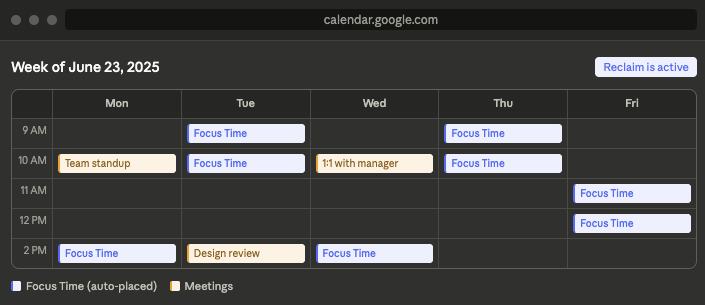
Step 5: Test How It Handles Conflicts
Insert an additional meeting over the scheduled focus time. An effective zero-click configuration will automatically relocate the focus block to its next available slot rather than simply overwriting it. This is, in fact, the real test of whether it is “zero-click,” rather than a one-time recommendation.
Step 6: Review once a week
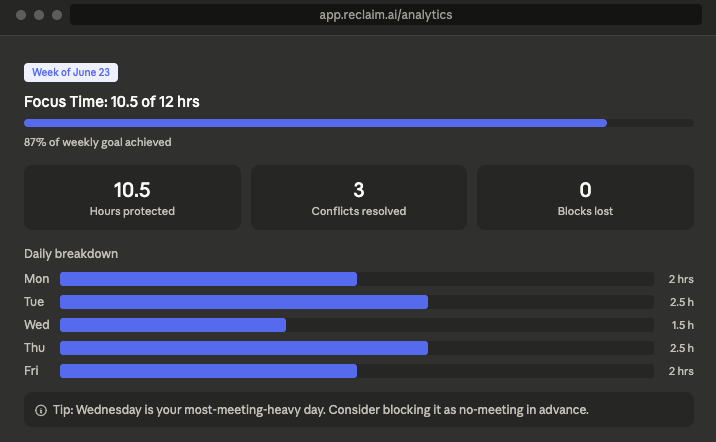
Check how much Focus Time you actually completed versus your goal. Adjust your working hours, block length, or priority windows based on what you see.
Best Practices
- In the beginning, keep it simple by establishing one focus time goal and basic work hours. Complexity (e.g., scheduling habits, task synchronization, time buffers) can be added later once you have established the simple focus and timeframes.
- There should be at least one scheduled window where no meetings occur. As little as 2 hours each week when no meetings occur will make a significant difference in daily productivity.
- Review weekly instead of “set and forget.” Your priorities change; your scheduling rules should too.
Common Pitfalls
- Over-customizing too early. Too many rules at once make it hard to tell what’s actually working.
- Not Syncing All Your Calendars: When you do not connect your work and personal calendars, the AI cannot schedule effectively because it lacks complete information about all your obligations.
- Ignoring AI suggestions instead of adjusting them. If a suggested time consistently doesn’t work, tweak the rule rather than manually overriding it every time. That defeats the point of zero-click scheduling.
Final Thought: One Goal. One Week. Let the AI Do the Rest.
The goal isn’t a perfectly automated calendar. The goal is more protected time for the work that actually matters.
An AI calendar gets you there by removing the one task that kills productivity before the day even starts: manually rebuilding your schedule around everyone else’s. Set your Focus Time goal, let the AI handle the rest, and use that time to actually get things done.
Start with one week. One goal. See what survives.

I’ve had my manual focus blocks overwritten by meetings so many times, I can’t even count. This zero-click AI approach sounds like it actually solves the core problem instead of just patching it.